Introducing Novee Workflows: Automate Everything Beyond the Pentest
Novee now lets you automate the manual processes around your tests. You can route issues, alert on critical findings, deliver compliance summaries, and create remediation tickets.

Finding a vulnerability is only the beginning. Someone needs to be notified, the right team needs to take ownership, a ticket needs to be created, and once a fix is ready, someone needs to verify that it worked.
Multiply that across hundreds of applications and continuous assessments, and security teams can spend as much time coordinating the work as they do addressing the risk.
Today, we’re introducing Novee Workflows, a new way to automate the actions that happen throughout the pentesting process. Define what should happen when a finding is discovered, a ticket changes status, or an assessment finishes, and Novee handles the next steps automatically.
We’re also introducing Scheduled Assessments, making it easier to run deep, recurring pentests without manually starting each one.
Together, these capabilities bring us closer to fully autonomous, continuous penetration testing – where testing runs consistently, findings reach the right people, and remediation progress is verified without someone having to chase every step.
Workflows: Your Rules, Your Processes
Every security team works differently. A critical vulnerability in a payment application might require immediate escalation, while a medium-severity issue in a less critical application may follow a standard ticketing process.
With Novee Workflows, you can define those processes once and let them run automatically.
Workflows combine three building blocks:
- Triggers: Choose what activity starts a workflow, such as when a new issue is discovered, a ticket status changes, or an assessment completes.
- Conditions: Define which findings or assets the workflow applies to, using criteria such as severity, issue type, asset, or business criticality.
- Actions: Tell Novee what to do next, from creating tickets and sending Slack notifications to assigning issues, updating statuses, and triggering reassessments.
You can combine conditions and actions to create workflows that match how your team operates. Start with a template or build your own using the workflow editor.
What Can You Automate With Novee Workflows?
Here are some of the ways teams can put Workflows to work.
1. Escalate Critical Vulnerabilities Immediately
When Novee confirms a critical vulnerability, automatically send an alert to the appropriate Slack channel.
The right people know about the issue as soon as it’s discovered, without waiting for someone to review a report or forward a finding.
2. Route Findings to the Right Teams
Automatically create tickets in Jira, Asana, Linear, and other project management tools based on the affected application, asset, or severity.
For example, vulnerabilities affecting payment services can be routed to the payments team, while API findings go to the team responsible for those services.
Security teams spend less time sorting findings and tracking down owners. Developers get actionable issues directly in Jira, where they already work.
3. Automate Remediation Follow-Up and Retesting
A finding shouldn’t disappear from view just because someone marked a ticket complete.
With Workflows, teams can automate the remediation follow-up process:
- Novee validates a vulnerability and creates a ticket in the connected ticketing system.
- When the ticket is marked complete, Novee automatically triggers a reassessment.
- Once the reassessment finishes, Novee can update the issue status based on the verdict.
This helps teams verify whether vulnerabilities have actually been addressed, without manually tracking ticket changes and launching retests.
4. Keep Stakeholders Informed
Not everyone who needs security updates works inside Novee.
Configure a workflow to notify an application owner when an assessment completes, send a summary to a security channel, or alert stakeholders when important findings are discovered.
Teams get the information they need without another round of manual reporting.
5. Match the Response to the Risk
Not every finding needs the same response.
Create workflows that escalate Critical and High issues through tickets and Slack alerts, while routing lower-severity findings through a lighter process.
That keeps attention focused on the issues that matter most and reduces unnecessary noise.
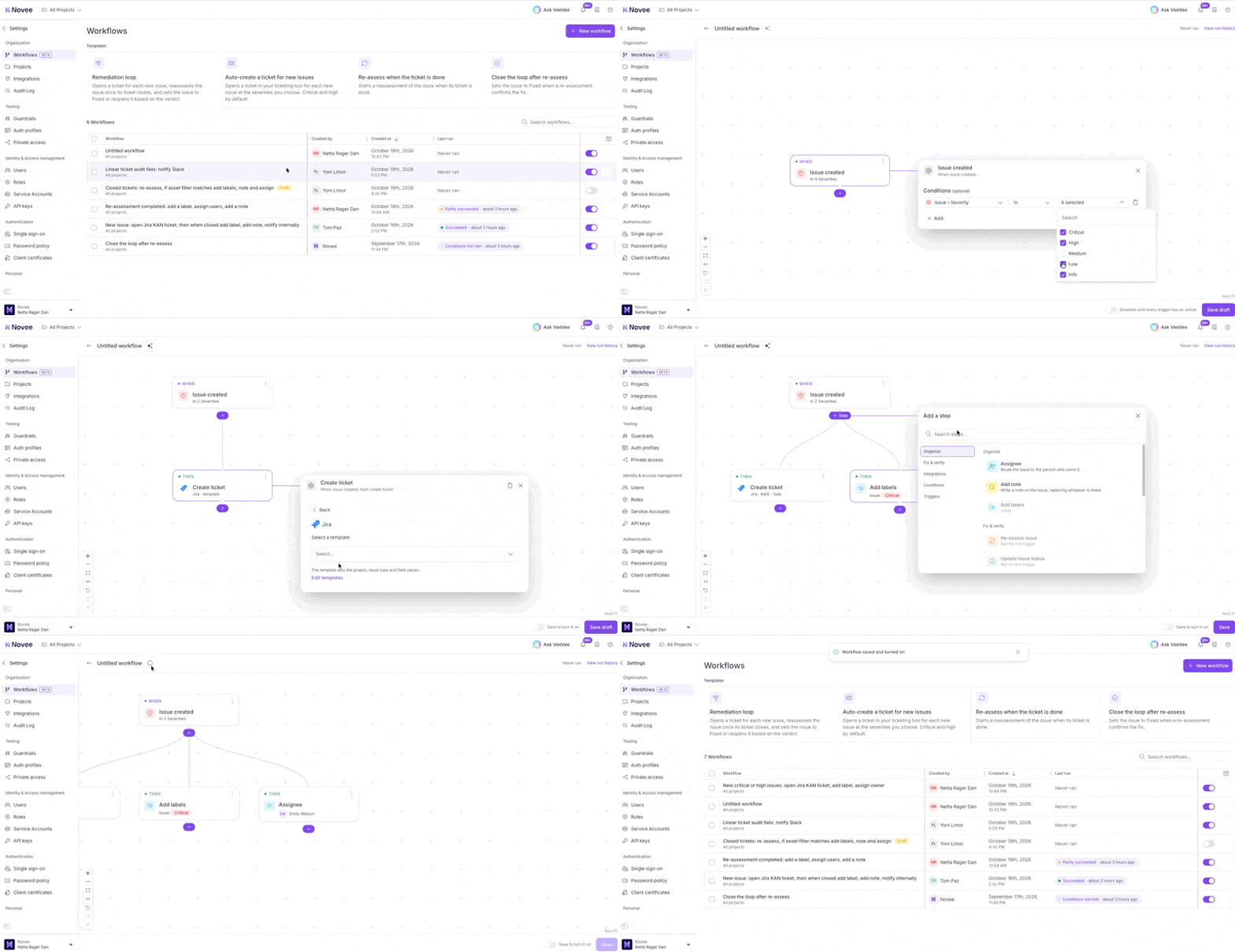
You can also build a workflow by submitting a natural language prompt, and letting Novee assemble the rule for you.
Introducing Scheduled Assessments: Keep Testing Without Manually Starting Every Run
Workflows automate what happens around your assessments. Scheduled Assessments make sure the testing itself happens on the cadence your organization needs.
Set a recurring schedule for an application, choose its testing window, and Novee automatically runs a full AI penetration test at the defined interval.
For example, you might schedule a full assessment every month to maintain broad coverage, while using Novee Pipeline to trigger targeted delta testing as code changes.
And when an assessment completes, Workflows can take over – notifying owners, creating tickets, and routing findings based on your rules.
This gives teams a practical way to combine recurring deep testing with automated follow-through.
From Autonomous Testing to Autonomous Security Workflows
Novee is an AI penetration testing platform built to continuously test applications the way real attackers do, validate exploitable vulnerabilities, and guide remediation.
Workflows extend that automation beyond the assessment itself.
Instead of manually reviewing every result, deciding who to notify, creating tickets, following up on fixes, and launching retests, teams can define their processes once and let Novee handle the repetitive steps.
The result is less administrative work, faster response to real vulnerabilities, and a more consistent path from discovery to verified remediation.
Novee Workflows and Scheduled Assessments are available to Novee customers.
Book a demo to see how they work.